

The raging debate between HubSpot and Odoo in the CRM landscape is really a comparison between a “front-office” technology and an all-in-one tool.
On one hand, HubSpot is the go-to choice for inbound marketing, boasting over 228,000 global customers. On the other hand, Odoo is an open-source powerhouse catering to over 12 million users. Although both platforms claim to be the best CRM solution, each was built for fundamentally different purposes.
While most guides jump into this debate and declare a winner without context, this article provides a more transparent comparison. It compares features, cost, data ownership, and migration factors. If Salesforce is also on your shortlist, see our Odoo vs. Salesforce 2026: Complete Comparison. If you’re considering the best CRM platform for your business, this guide will help you make a more informed choice.
Odoo vs. Hubspot – Key Takeaways
Choosing the right CRM is like selecting an engine for your business; it is an important decision that will impact your operational efficiency and long-term business performance. This Odoo vs. HubSpot comparison reveals their distinct philosophies, strengths, and downsides.
While HubSpot is a polished, front-office tool focused on intuitive inbound marketing and sales automation, Odoo offers an all-in-one ERP system with integrated modules for full business management.
To make a practical choice, you must consider your business needs, such as:
- User Experience and Marketing: Here, HubSpot leads with a simple, intuitive platform that is highly effective and easy to use.
- Customization and Scope: Odoo trumps here, offering limitless flexibility with code-level access. It also connects your CRM data with other modules for full business management.
- Cost and Data Ownership: While HubSpot’s modular pricing leads to a pricing cliff, Odoo’s per-user flat fee provides access to all its ERP apps, reducing TCO at scale. You also enjoy complete data ownership with Odoo, unlike the risk of vendor lock-in with HubSpot. For businesses choosing Odoo, hosting plays a big role in keeping that cost advantage intact. Cloudpepper is a managed Odoo hosting option that pairs well with both Community and Enterprise editions, starting at $29/month with a free plan to test.
Odoo vs. Hubspot: Different Tools Solving Similar Problems
The strongest foundation for an informed choice is a clear understanding of your options. This section provides an overview of Odoo and HubSpot, including what to expect from each.
What Odoo Is ( and Isn’t)
Odoo is a suite of open-source business applications designed to handle multiple company operations on one platform. It functions as an all-in-one enterprise resource planning (ERP) system, with CRM as just one of over 80 integrated modules.
This all-in-one, full-featured operation is Odoo’s core strength. It is built on an open-source architecture, available through the free Community Edition or the Paid Enterprise Edition. For Odoo hosting, you can host it as SaaS or run it self-hosted for complete data control.
Due to its exciting but complex features, Odoo is not a simple plug-and-play tool. Using Odoo requires more technical knowledge than using HubSpot.
What HubSpot Is (and Isn’t)
HubSpot is an AI-powered CRM platform designed to help businesses unify their service, sales, and marketing efforts. Starting as an inbound marketing platform, it has evolved into one of the industry’s most intuitive front-office suites.
The platform excels in marketing automation and sales pipeline management. Unlike Odoo, it is built on a closed-source architecture, meaning it runs only in the cloud. In addition, it does not handle any back-office operations. Therefore, businesses using HubSpot must integrate it with third-party ERP tools to achieve full coverage.
“Odoo is a sort of a Swiss army knife. This means it is versatile, … if you don’t need anything special and really happy with the basic features, Odoo can really be a problem solver for you.” For more, check this Reddit thread.
Why this Comparison Matters
Although both platforms share similar CRM features, their core architecture and DNA differ. This will impact what they can do for your business in the long-term. If your business chooses the wrong platform, you may incur an expensive technical debt for the future.
This comparison will help you evaluate each option to make the right choice based on your business type, growth stage, budget, ease of use, and data ownership policies.
Odoo CRM vs. HubSpot CRM: Feature-by-Feature Comparison
According to Selecthub, Odoo has an 82% user satisfaction rating while HubSpot has an 88% rating. However, to effectively compare and choose a platform, you must look beyond the platform description and investigate the everyday tools your team will use.
Core CRM Features
At the basic level, both platforms offer a wide range of tools for managing the sales funnel from capturing leads to forecasting and even mobile access. The table below offers a side-by-side comparison of the core features and how each platform offers them.
| Feature | Odoo CRM | HubSpot CRM |
| Contact & Company Management | Unified database across all business apps. | Highly intuitive, marketing-centric records. |
| Pipeline Management | Kanban-style with drag-and-drop custom stages. | Visual pipeline with “deal rotting” alerts. |
| Activity Logging | Integrated with internal ERP notes and emails. | Built-in calling and automated email tracking. |
| Lead Capture | Web-to-lead forms and automated lead scoring. | Advanced behavioral triggers and AI-powered scoring. |
| Email Integration | Full Gmail and Outlook synchronization. | Native Gmail/Outlook sidebar and tracking. |
Pipeline and Sale Management
HubSpot provides a polished visual pipeline with built-in calling, email sequences, and lead scoring to aid sales reps. Conversely, Odoo offers a more flexible kanban pipeline with custom stages and multiple support.
As a result, teams focused solely on sales may lean toward HubSpot. However, if your team is focused on the entire operation, Odoo proves more valuable. Unlike HubSpot, its pipeline connects directly to manufacturing and invoicing. This supports instant warehouse notification when a sale is made.
Marketing Automation
For marketing, HubSpot offers top-industry automation with multi-step workflows and A/B testing. It uses nurture signals and behavioral triggers to automate marketing processes. However, accessing this advanced automation requires a paid Professional tier subscription.
On the other hand, while Odoo’s marketing automation is less sophisticated, it offers a unique integration ability. You can integrate the marketing module with inventory and accounting to eliminate data silos between your marketing efforts and results.
Reporting and Analytics
With an Enterprise tier subscription, you can access Hubspot’s pre-built dashboards and forecasting AI that allows you follow all marketing expenses to see which dollar generates sales.
Nevertheless, Odoo still trumps in operational reporting. As an ERP, it allows you to create more detailed reports that cover sales and inventory data with profit and loss statements from accounting.
Customization and Flexibility
Odoo offers almost limitless customization. You enjoy customization features, from drag-and-drop to full code-level access, so you can change anything. While customization is possible in HubSpot, it only allows you to add custom properties and objects, without access to the underlying code.
“Odoo is very modular and extremely customizable. With a good dev or a good dev team, almost anything can be done in Odoo, it’s just a question of resources and need.” For more, check this Reddit thread.
HubSpot vs. Odoo Pricing: True Cost Comparison
For many businesses, pricing is the point of difference between these CRM platforms. This section considers the pricing structure and hidden fees on both platforms.
The HubSpot Pricing Structure and Hidden Fees
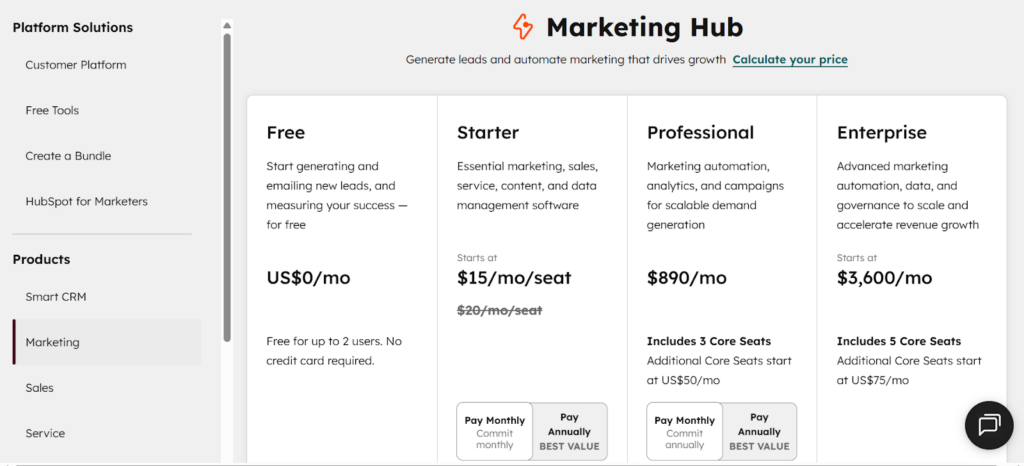
Regarding costs, HubSpot has a low barrier to entry but maintains a pricing cliff. This is a point where your costs shoot up as you grow. Generally, HubSpot uses a modular pricing structure where you separately pay for different Hubs, such as the service, sales, and marketing hubs.
Below are the current marketing pricing tiers on HubSpot, offering varying features:
- Free CRM @ $0 per month
- Starter @ $15 per seat per month
- Professional @ $890 per month (includes 3 core seats)
- Enterprise @ $3,600 per month (includes 5 core seats)
For the professional and enterprise plans, HubSpot requires an extra $3,000 and $7,000 onboarding fees, respectively, outside the seat price.
Other hidden fees include:
- Contact Tier Overages: You’ll be charged per 1,000 contacts above your limit plan.
- Limit Charges: You incur additional costs for more email sends, higher API call limits, and custom dashboards.
Odoo’s Pricing
Odoo’s pricing model is much more affordable compared to Hubspot:
- Community Edition: $0 (unlimited users, self-hosted, open-source)
- One App Free: $0 (one app, unlimited users, hosted by Odoo)
- Standard: $31.10/user/month (all apps, hosted by Odoo)
- Custom: $61/user/month (all apps, plus Studio, multi-company, API access, and third-party hosting)
For hosting, you have three options: Odoo’s own SaaS platform (Odoo Online), Odoo’s developer-focused cloud (Odoo.sh), or a third-party managed host. Odoo.sh adds infrastructure fees on top of your license cost, which can add up quickly.
One thing worth knowing: these rates apply to Tier 1 countries like the US and Western Europe. Odoo charges significantly less in Tier 2 markets like Brazil, and less again in Tier 3 markets like India.
For third-party managed hosting, Cloudpepper is a popular choice among Odoo users and implementation partners, and typically more affordable than Odoo.sh
Data Ownership: The Critical Difference Nobody Talks About
Your CRM holds some of your most important assets, from your customer relationships to communication history and sales patterns. However, many businesses fail to understand just how much of this asset they own until it is too late.
Therefore, it is important to understand the data ownership policy before choosing a CRM platform to ensure you maintain reasonable control while using the platform.
What You Need to Know About HubSpot Data Ownership
HubSpot can be accurately compared to a “walled garden.” Your data is stored on their servers. So, while you can export your core records, rebuilding your sequences and workflows can be very challenging, expensive, and time-consuming. That is because the logic used on HubSpot is proprietary to the platform. You can’t export that as well.
In addition, after closing your account, you only have a 90-day window to move your data before the platform permanently deletes it. HubSpot also has a risk of vendor lock-in. The longer you stay on the platform, the more expensive it is to leave.
Odoo Data Ownership: An Option for Full Control
Compared to HubSpot, Odoo offers much greater vendor independence. In fact, when you choose the Odoo self-hosting model, especially through a managed provider like Cloudpepper, you enjoy complete data ownership.
Odoo’s PostgreSQL architecture allows you to perform a full database dump anytime you desire. You can easily move every byte of your data in a portable format.
Cloudpepper takes this a step further with its DevOps plan, which lets you connect your own servers from providers like AWS, DigitalOcean, or Vultr. If you ever cancel, your servers and data stay with you, no migration headaches required.
HubSpot Odoo Integration: Making Both Work Together
The Odoo and HubSpot CRMs are not mutually exclusive options. Many businesses have adopted a dual-platform system featuring HubSpot and Odoo as a strategic move to satisfy team preferences or ensure seamless migration, among other reasons. But how do you connect both systems?
Integration Options Available
There are many technical methods to connect a HubSpot with an Odoo ecosystem. Your choice will depend on your budget and data needs. Consider some popular options below:
The Native Odoo-HubSpot Connector
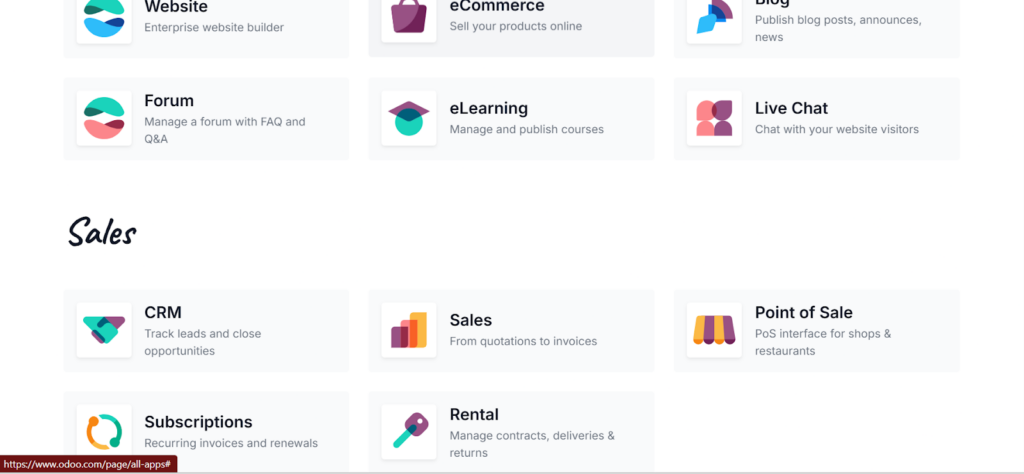
These connectors offer two-way synchronization for companies, contacts, and activity logs. You can find these connectors in the Odoo App Store. They cost between $200 and $600, either as an annual subscription or a one-time purchase.
Using Zapier/Make.com/n8n
This is the best option for a no-code automation. These tools support flexible action workflows without developer assistance. For a step-by-step walkthrough using n8n, see How to Integrate Odoo with n8n. Although they do not sync instantly, their speed can be rated as “near real-time.” The cost of this service varies based on your task volume.
Custom API Integration
If your business needs true real-time sync and full control over data mapping, it is best to get a custom-built solution from a developer. For this, you’ll only incur the cost of development and some ongoing maintenance costs.
Integration Challenges to Expect
Enjoying the best of both worlds comes with some unavoidable challenges, such as:
- Data model conflicts that can lead to lost records.
- Workflows wars that may risk internal confusion or spamming customers.
- Maintenance overhead from manual adjustment is required to satisfy major updates from either platform.
When Integration Makes Sense vs. When to Consolidate
Integrating both platforms is ideal when your business has very limited overlap in the features needed from each system. You can also choose integration in a transition period and two teams refuse to switch tools.
However, it is best to consolidate to HubSpot when you only need marketing automation and do not require ERP capabilities.
Alternatively, you can consolidate to Odoo when integration costs are higher than the cost of switching or when there is a risk of operational errors.
Odoo Hosting for CRM Deployment: Why it Matters
The right hosting infrastructure is not just a simple technical detail; it is a basic requirement that affects your uptime and overhead. For a full breakdown, see The 4 Best CRM Hosting Providers in 2026.
Reliable hosting ensures undisturbed uptime for sales teams to log calls and close deals to bring in revenue. It also eliminates the sluggishness factors, allowing records to load in real-time to improve workflows.
Hosting Options for Odoo CRM
There are many reliable options for hosting Odoo to ensure optimal speed and functionality. These include:
Cloudpepper hosting
Cloudpepper offers managed Odoo hosting that provides the simplicity of HubSpot with full data ownership and customization of an Odoo instance.
Cloudpepper was specifically engineered for Odoo. As a result, it offers several major advantages, including:
- Automated safety: It provides daily backups to ensure full recovery of your history in the event of issues.
- Staging Environments: You get unlimited staging environments to test new workflows and modules before they go live.
- Data Residency: Cloudpepper offers EU-hosted servers to ensure that your customer data stays within your preferred jurisdiction for GDPR compliance.
Odoo.com SaaS Hosting
While this is the easiest option, you’ll lose the “Open Source” advantage with this option. Odoo.com restricts customization and access to the underlying database.
Self-Managed Hosting (With AWS or Azure)
With self-managed hosting, you get maximum control. But to enjoy this, you need a dedicated DevOps engineer on your team. So, if you’re running a small or mid-sized business, it may be a very expensive option.
Traditional VPS Hosting
This is another budget-friendly option. But here, you’ll be trading Odoo-specific optimization. Usually, when things go wrong on such hosting services, the provider will blame the software, while the software providers point back at your hosting provider.
Conclusion
Choosing between Odoo and HubSpot is not about picking the better interface; it is about deciding whether you want a specialized marketing tool or a full business operating system.
After reviewing the features, pricing, technical architecture, and hosting needs and options, it is clear that there is no universal winner. There is only one right choice for your business, based on your business model and needs.
Whether you decide to consolidate to either platform or integrate both, make sure your choice factors in your present and future needs to aid your business growth and seamless scaling.
